Thursday, May 24, 2012

How to search Google Like a Pro ?


Hello Friend's

This should sound stupid that i am writing a note that how to search stuff on google but there is lot that we are misisng on this powerful tool.
You miss a lot when you just type word's into it.
Whether you’re an inexperienced user or a seasoned professional, you’ll probably find at least one search operator you weren’t aware of here. Many of Google’s search operators aren’t very well-known.

Here are some ways that you can master the google search,,,,

Exact Word and Phrases

One of the most basic and widely known search tricks is using quotation marks to search for an exact phrase.For eg:-For example, perform the following search and you’ll only get pages that contain the word “Windows” followed by the word “8.”
This same method now works for exact-word queries. For example, if you search for “swimming,” Google will also show pages that contain the words “swimmers.” Previously, you’d use a plus sign and search for +swimming, but now you have to enclose the word in quotes "swimming",this will give you results only on Swimming term.

Excluding a Word

The minus sign allows you to specify words that shouldn’t appear in your results. For example, if you’re looking for pages about Apple distributions that don’t mention MacBook, use the following search:
Apple distributions -MacBook

Site Search

Site searches are the one that we all gun for so that we can get stuff directly from the site and not going again of algorithms of searching on the site.
The site operator allows you to search the stuff within the site so that you can cut down your navigation,Lets say you are looking for information on IPAD 3 on www.apple.com,You could use the following search 
site:apple.com IPAD 3....
This will lead to IPAD 3 info on www.apple.com

Note :- You can also use the site operator to specify a domain.For eg:- If you are looking for high quality references you could use site : edu to pull up results from .edu domains only.

Related Words

The tidle operator (~) is the opposite of enclosing a single word in quotes - it searches for related word's not only the word you type.If you want to find something related bungy jumping you can run search in following manner..
~bungy jumping or ~bungy

The Wildcard

 The asterisk (*)  is a wild card that can match any word.Eg:- If you wanted to check which companies has google  purchased and how much they paid, you can use this search:-
 "google purchased * for * dollars"

Time Ranges

This will allow you to find what has happend to what in that specific time.For eg: - if you want to know about iphone between the years of 2007 till 2010 you can run the following search
iphone 2007..2010

File Type

The File type operator lets you search files of specific type in a particular site through google.For eg: - you could search for only PDF files by using this
filetype : pdf warez-bb.org 

One Word or the Other

The OR operator allows you to find word that contains one term or another.For eg : - If you want to find something that gives results of Iphone or an Ipad then you can do the following :-
Iphone OR MacBook.
Note :- The Operator OR should be in Upper case.

Word definitions

You dont have to google a word and look for dictionary to check its definition google will do it for you.
Use this trick and you will see an inline definition
If you want to find the definition for the word Biology use the following search type.
define:biology

Calculator

Use google instead of using calculator or launching an Calculator APP.
Use the +,-,*,/ symbols to specify arithmetic operations and for complicated operations use bracket.
Check this out

(4+3)* (6/3) will give you == 12

Unit Conversion

The calculator can also convert between units.Just type "X [units] in [units]".......
Eg : - 10 kilometers in meters will give you == 10 kilometers = 10 000 meters.


Author,
Raj.Trivedi
http://kcwithfun.blogspot.com


Monday, May 21, 2012

Facts about Marriage


Wedding INVESTMENT:- Average 30 yrs

Rs.20,00,000 Marriage expenses
Rs.30,000 Monthly expenditure
Rs.3,000 Wife's monthly maintenance

RETURNS:- SEX

First 5 yrs Weekly 3 Times.
Next 5 yrs Weekly 1 Time.
Next 10 yrs Once in 15 days.
Next 10 yrs Once in a month.
Meaning -
1400 times sex in 40 years for an estimated expenditure of a whooping 1,78,40,000
+
Opportunity cost on 20,00,000 spent on wedding at 7% for 40 years as per current Post-tax FIxed Deposit Interest rate
2,98,48,915.68  = 4,77,88,915.68

COST

A Man spends Rs.34,135 for each time he has Sex with his Wife.
Outsourcing is cheaper.

JAGO GRAHAK JAGO.....


Author,
Raj.Trivedi
http://kcwithfun.blogsopt.com

Saturday, May 19, 2012

Major Torrent Sites Blocked by Indian Government(the Pirate bay,Ahashare,isohunt etc)


Every Day you wake up and think that what movie you are gonna download or what TV series you gonna download..you turn your Computer browse your regular torrent site EG:- thepiratebay.se and suddenly you get 

"This site has been blocked as per the instructions of Competent Authority"
and you go mad saying Holy shit from where i will download my favourite torrents and movies and stuff.

This step was started by the Government from 6th May and you will ask how did i realised that the torrent site is blocked when suddenlt the download of Harry Potter Movie Series stop even when there were good Peers and Seeds and when i checked the site it was blocked so the Government has completely blocked the content as well :(....
Even after 13 Days the Download has stuck at 15 %.

What Caused this Blocks ?

If Some one remembers that in early days of 2012 SOPA (STOP ONLINE PIRACY ACT) and PIPA (PROTECT IP ACT) created a havoc where even the famous wikipedia blacked out the site against the process of SOPA and PIPA.........and this has led India to jump into these blocked seat.

News has it that India is the latest to have joined the ‘BitTorrent sites ban’ bandwagon, resulting in the ban of sites, like The Pirate Bay, KickAssTorrents,isohunt,ahashare BitSnoop and other large BitTorrent websites and popular video-sharing website, Vimeo.

Users of the Internet services provided by ISPs, like Reliance Communications and Zylog Wi5, MTNL,BSNL and Airtel reportedly have lost access to these websites, and those trying to access these websites now will be met by an announcement by the Department of Telecommunications (DoT), which states that "This site has been blocked as per the instructions of Competent Authority"

According to media reports, this is because a film production house, namely Reliance Entertainment, has (once again) obtained a preemptive ‘John Doe‘ order from the Delhi High Court, prior to the release of some of their upcoming big budget films. The Company insists that this has been done in order to ‘prevent film piracy’.

After Reliance Communications and other ISP's, which had blocked video sharing sites Vimeo and DailyMotion, torrents sites like thepiratebay, text and code sharing platform Pastebin, and bookmarks sharing site Xmarks, Airtel has also joined, and has started blocking the above mentioned websites, in addition to a large number of Torrent search sites.

The latest ban, affecting the blackout of the aforementioned websites, thereby snapping access, comes as a continuation to what has been a long battle against such BitTorrent websites (remember MegaUpload?) Reports have it that the ban seems to be a government-directed one, and subscribers to all major Internet service providers in the country seem to be among those affected.

Although the government has not confirmed the move, news out of India is that there has been a massive blocking of torrent and other video-sharing sites and the list will pile up

Internet Piracy has been giving creatives sleepless nights and the run against MegaUpload, which began in the UK has only gained momentum with India joining in. Although, there has been no confirmation on whether the ban is government-directed, the fact that the error message is the same as what appeared when MegaUpload was blocked gives it away.

While the ban on The Pirate Bay, and other BitTorrent websites doesn’t come as much of a surprise, Vimeo featuring on this list has surprised many. Vimeo, as most of us would know is a popular video-sharing website, and not a BitTorrent website, like the others featured on this list, and is legal, for most parts. Vimeo is largely used by independent filmmakers to share their work. Now it isn’t clear, as to why Vimeo has featured on this list, considering that it is similar to YouTube and is a video-sharing website.

Some of us however, are still able to access the sites that have been claimed to be blocked by the ISPs, therefore, there still is a certain level of ambiguity as to subscribers to which ISPs have been affected by the blockage.

Now you would be wondering that you wont get free downloading with the P2P client and you will find it difficult to get your favourite movies and will hamper your collection thats true but I personally believe that this smalll glory of success of the Government will not last for long....remember my Note on  "Songs.pk Blocked and then re directed their weburl" i believe the Big torrent players will do the same or re-register the domain with a different and register in a different Country so eventually you will still get your free stuff nut you might have to show some searing talent on google to find new Torrent Reactor's to give you the same Content.........

List of the Torrent Sites Blocked

www.ahashare.com
www.Isohunt.com
thepiratebay.org
thepiratebay.se
http://torrentz.eu/
http://kat.ph
http://torlock.com
http://kickasstorrents.com
http://torrentfunk.com
http://fenopy.eu
http://www.dailymotion.com/
http://vimeo.com/ (Video Sharing Centre)

If you come across more site send me a message on Facebook i will add to the list.

But still you can browse there sites on your Mobile phone...........Its still not blocked with vodafone 3G
but i cannot guarantee that the torrent that you have downloaded will work fine to download the content from your PC as might be Your ISP might have blocked the content

I personally think that its fair on part of Original Makers of the content to fight against the Piracy but my inner devil still wants stuff free.Well if you ask me for me i have only 1 Motto for Electronic Stuff or Digital stuff i.e.
Sharing is Caring.

I am not backing this step from Government because some day with this core idea of blocking Indian Government can block Facebook and Youtube as it is a User Generated Content Web Portal where you share and Upload stuff which
95% of time you dont own............................

TELL ME What do you think ?


Author,
Raj.Trivedi
http://kcwithfun.blogspot.com


Saturday, April 14, 2012

Why never go to HR For Help ?


Office Humour: 

After 2 years of selfless service, a man realized that he has not been promoted, no transfer, no salary increment, no commendation. So he decided to walk up to his HR Manager. His manager looked at him, smiled and asked him to sit down saying: 

"My friend you have not worked here for even a single day." The man was surprised to hear this, but the manager went on to explain. 

Manager:  How many days are there in a year? 

Man:  365 days and sometimes 366.

Manager: How many hours make up a day?

Man: 24 Hours.

Manager:  How long do u work in a day?
 

Man: 10am to 6pm i.e 8 hours a day.

Manager:  So, what fraction of the day do u work in hours?

Man:  He did some arithmetic and said 8/24 i.e 1/3 (one third).

Manager: This is nice of u! what is 1/3rd of 366 days? 

Man:  122(1/3 x 366=122 in days)

Manager:  Do u come to work on weekends?

Man:  No sir.  

Manager:  How many days r there in a year that r weekends?

Man:  52 Saturdays and 52 Sundays equals to 104 days. 

Manager:  Thanks for that. If u remove 104 days from 122 days. how many days do u now have?

Man: 18 days.

Manager: I do give u 2 weeks sick leave every year. Now remove that 14 days from the 18 days left. How many days do u have     remaining? 

Man: 4 days.

Manager: Do u work on Republic Day?

Man:  No sir! 

Manager:  Do u come to work on Independance Day?

Man:  No sir!

Manager:  So how many days r left?

Man:  2 days Sir!

Manager:  Do u come to work on New Years Day? 

Man:  No sir!

Manager:  So how many days r left? 

Man:  1 day sir!

Manager:  Do u work on Christmas Day?

Man:  No Sir!

Manager:  So how many days r left?

Man:  None Sir!

Manager:  So what r u claiming?

Man:  I have understood, Sir. I did not realise that I was stealing company money all these days. 

Moral-NEVER GO TO HR FOR HELP!!!
 

HR-HIGH RISK.

No Offence's Its just for Fun...........

Author 
Raj.Trivedi
http://kcwithfun.blogspot.in


Monday, April 9, 2012

How to Create a Password Protected Folder without any Extra Software

There are a lot of methods that you can use to create a password protected folder, most of which require the use of some third party software. Using this neat method you can hide your folders with a quick batch script.


Create Your Password Protected Folder


Before you get started you need to create a folder that will house your password protected folder, this is just an ordinary folder and can be located anywhere and named anything.


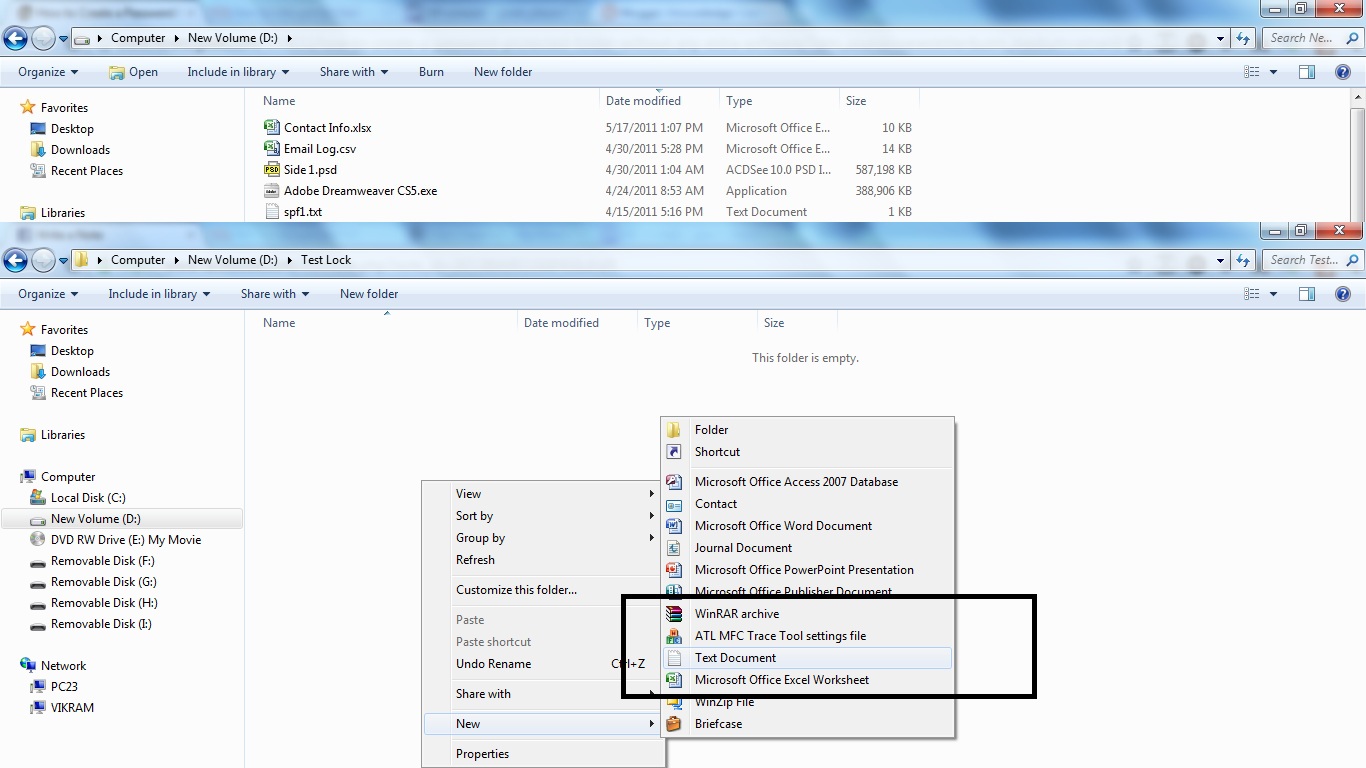
Navigate into your newly created folder and create a new Text Document. This can easily be done from the context menu i.e. right click - > Select New Text Document.


Open the document, now paste the following code into the contents of the document:

******************************************************
cls
@ECHO OFF
title Folder Private
if EXIST "HTG Locker" goto UNLOCK
if NOT EXIST Private goto MDLOCKER
:CONFIRM
echo Are you sure you want to lock the folder(Y/N)
set/p "cho=>"
if %cho%==Y goto LOCK
if %cho%==y goto LOCK
if %cho%==n goto END
if %cho%==N goto END
echo Invalid choice.
goto CONFIRM
:LOCK
ren Private "HTG Locker"
attrib +h +s "HTG Locker"
echo Folder locked
goto End
:UNLOCK
echo Enter password to unlock folder
set/p "pass=>"
if NOT %pass%== PASSWORD_GOES_HERE goto FAIL
attrib -h -s "HTG Locker"
ren "HTG Locker" Private
echo Folder Unlocked successfully
goto End
:FAIL
echo Invalid password
goto end
:MDLOCKER
md Private
echo Private created successfully
goto End
:End

**********************************************************
Note :- Do not copy and paste the asterisks.

Change the PASSWORD_GOES_HERE text to the password you want to set. Now go ahead and save or do save as the file as locker.bat


Once the file is saved as a batch file you can delete the original text file.

Now run your batch file by double clicking on it–the first time you run it, it will create a folder called Private. This is where you can store all your secret things. When you have finished adding all your stuff to the Private folder, run locker.bat again.


Press Y to lock the folder and after that the private folder will disappear and to unlock the folder again double click the folder and it will ask you the password that you gave.


After you punch the password the folder will come again and then you can add stuff and again run the file to lock it.
If you enter the incorrect password the script will just Terminate.

You can use this method at your home coz these script is editable if the user has good hands on Tech knowledge and can know your password but only if  he understands how to open batch file otherwise not.

Author
Raj.Trivedi


Friday, March 23, 2012

Windows 8 new Short Cut Keys apart from regular ones


Hello Friend's i am back with some more info on Windows 8............

This time i have jotted down some new short cut keys in Windows 8,i might have missed a few but the one's that are important i am throwing it out

Short Cut Keys :- 

  • Windows key – brings up the Metro start screen. You can start typing to search for an app, just like the Windows 7 start menu.
  • Win + D – brings up the old Windows desktop.
  • Win + C – brings up the Charms menu, where you can search, share, and change settings.
  • Win + I – opens the Settings panel, where you can change settings for the current app, change volume, wireless networks, shut down, or adjust the brightness.
  • Win + Z – opens the App Bar for the current Metro application.
  • Win + H – opens the Metro Share panel.
  • Win + Q – brings up the Metro App Search screen.
  • Win + W – brings up the Metro Settings search screen.
  • Win + F – brings up the Metro File search screen.
  • Win + K – opens the Devices panel (for connecting to a projector or some other device)
  • Win + ,  (comma) – Aero Peek at the desktop.
  • Win + .  (period) – Snaps the current Metro application to one side of the screen. (Right side)
  • Win + Shift + . (period)  – Snaps the current Metro application to the other side of the screen. (Left side)
  • Win + J – switches focus between snapped Metro applications.
  • Win + Page Up / Down – moves the current app to the other monitor.
  • Win + Tab – opens the Metro application switcher menu, switches between applications.
I am still in research Phase with new Windows 8 and thanks for liking my note:-
"Windows 8 -The Next Generation Operating System" 

Author
Raj.Trivedi


Friday, February 10, 2012

Windows 8 - The Next Generation Operating System


The Silicon Valley Giant Microsoft revealed plans to uneviedl a test version of Windows computer operating software later this month.

They have also sent out invitation's to experience Windows Consumer Previem in Barcelona on FEB 29 during a Mobile World Congress gathering in that city.The introduction of a test, or beta, version of Windows 8 to the public is expected to be accompanied by the opening of an " app store" known as Windows Store stocked with mini-programs tailored for the next-generation operating system. 

HardWare Requirement's

One good thing for Windows 8 Preview Developer installation is that you dont have to make system Upgrades for Installatin but the Final Release might force you to minor Upgrade's

Architecture :- ARM Processor (IA 32 BIT)
Speed Required :- 1GHZ
Memory (RAM) : - 1GB 
Graphic Card : - Direct x 9 Graphics device with WDDM 1.0 or Higher driver
HDD SPACE : - 16 GB (Free).


Architecture :-  X86 or X64 Processor
Speed Required :- 1GHZ
Memory (RAM) : - 2GB 
Graphic Card : - Direct x 9 Graphics device with WDDM 1.0 or Higher driver
HDD SPACE : - 20 GB (Free).

Note : - A multi-touch screen is recommended for Touch input cos some Metro App's does not support single touch input and for Metro App screen resolution should be 1024*768 or higher

Key Features of Windows 8
  1. Code Name for Consumer and Business PC :- Windows 8 following Windows 7.
  2. Code Name for Server Version :- Windows Server 8.
  3. Support for ARM Processor's in addition to X86 and X64 Intel and AMD Processor's
  4. Metro Style Interface has been added to support touch Input in addition to Mouse,Keyboard,Pen devices.
  5. Start Menu Replaced by Start Screen which will have tile view that basically are the short cut for Application's.
  6. The Tile Feature is a Reimplementation of Program Concept Manager.
  7. USB 3.0 Native Support without the need of Loading Drivers.
  8. Windows 8 will have Windows Store where consumer can buy and advertise an APP.
  9. Windows Explorer will now use a Ribbon Interface as MS Office Application's
  10. Windows to Go Feature Added,this allows to execute Windows 8 OS from a USB Drive,but this is not applicable in Windows 8 Preview.
  11. Mutliple Support of Monitors Added.
  12. The Developer Preview comes with 2 new Recovery Functions Refresh and Reset.
  13. User Account Change :- Accounts are not subjected to Local PC'S or ADD i.e. Active Directory Domain i.e. the account can be linked to one Windows Live ID.This will give one advantage to the user's that is they will not loose their setting on the go.
  14. Windows 8 will come with New Welcome Screen based on a New Application Model called APPX based on MS Silverlight.
  15. A new Hybrid Boot option that will allow user's to use Advanced Hibernation mode on shutdown to allow faster boot time.
  16. A new look and feel of WTM i.e. Windows Task Manager has been seen in Windows 8.
  17. Secure Boot : - This was one of the thing's in Windows 8 that lead to controversy.Its a UEFI based Feature that will prevent unauthorised Firmware,OS or UEFI Drivers from running at Boot time.This will force Microsoft to have new PC's to have UEFI Secure Boot feature enabled by default to be given a Windows 8 Certification.
  18. MS will require Manufactures like HP,Dell etc to turn on the secure boot on X86 HW but not on ARM H/W
  19. Release Date :- Not announced.

Statement of Authority

New Windows 8 Features were uneviled by Microsoft on September 13,2011 and also released a Preview developer of Windows 8 for developer's to start working on it.The Developer preview includes MS Windows SDK.According to Microsoft there were 500,000 download's within the 1st 12 hour of release.Microsoft also said that Windows 8 will be developed on the same road map as of Windows 7.In December 2011 at San Fransico in an Event Microsoft also uneviled the Windows Store that will be used to sell Metro Style APP'S.Microsoft said that the Public Beta will be released in this Month along with Windows Store beta.As of Feb 9,2012 it has been confirmed that the Build name will be 8227 and the consumer preview will be released at Mobile World Congress in Barcelona on FEB 29,2012.

Unique Authentication

A New authentication Method will allow user's to sketch in 3 different Places instead of Typing the Password.

Refresh and Reset 

Refresh :- Refresh acts like MS System Restore but there's a Slight change it will take back the Windows Settings back to DAY 1 without deleting any User Files and Data but it will remove all the Installed Application's.Still a Good way to get through Malware's and Spyware's without deleting your personal Data.

Reset :- Reset acts like fresh Installation of Windows this will delete everything from the User PC'S and a good change that it will not ask interaction from user's such as Accepting the License Agreement or even selecting the HDD Partition.After the Reset completes the user will be asked to enter the Traditional 25 digit Product Key and regarding for OEM Version it's yet not clear and then after entering the Product key the user will proceed to Account Creation.
Microsoft unveiled new Windows 8 features and improvements on September 13, 2011, day one of the BUILD developer conferenceMicrosoft unveiled new Windows 8 features and improvements on September 13, 2011, day one of the BUILD developer conference.

Compatability

Windows 8 for X86 Processor's will run most S/W compatible with X86 version of Previous version of Windows,with ususl restrictions,64 bit will also run 32 bit S/W but not 16 bit and vice versa.
One More good thing either 32 bit Windows or 64 bit Windows can be installed on X86-X64 Processor.
App's that were compatible to Windows 7 64 or Windows 32 bit they will run fine on Windows 8.
There's one limitation for Windows 8 for ARM Processor i.e. S/W created for X86 Processor will not work for Windows 8 developed for ARM processor the Developer's would have to start the Code from Scratch again.

Application Developement for Windows 8

 If you are intrested in APP developement then you can use Visual Basic,C++,C# and even third party compilers which allow application development e.g. Free Pascal.........

Conclusion

All in all i am waiting for the Final Release lets hope this will change the Microsoft's ERA with the Introduction of ARM processor's and boot time reduced to 14 sec as said so,and if this happen's then MS Windows Vista Failure will be forgotten by consumer's as APPLE is too Costly and Less APP's to play with.........
Still Microsoft are gambling beacuse this one fails then its a road down to barrell for Microsoft.................
Hope this does not happen.

Regard's
Raj.Trivedi
http://kcwithfun.blogspot.com

Windows 8 Metro UI - Start Screen(Replacement of Start Menu)

Total Pageviews

Me @Twitter


Subscribe to our Newsletter

Contact our Support

Email us: raj.200891@gmail.com

Our Team Members